This week I rewrote some parts of my original design document, and I've up with a more detailed approach for my project. After talking to people who have implemented similar projects, the general advice I gathered was that it was best to ensure basic functionality first, before trying to implement all the details of a paper.
My major goal last week was to read through all the papers and find one that is most relative to my project. Vijay, who worked on the Building Building Builder project from a previous year, recommended Interactive Visual Editing of Grammars for Procedural Architecture, so I've decided to focus on this paper after I've created the tool with some basic functionalities.
As for the work flow, my plan for next week is to finish reading about scripting for and have a basic plug-in running that can create a cube and apply basic transformations (namely scale and rotation). The next step after that would be to add additional faces and edges onto the cube.
I'm really looking forward to next week and having a skeleton up and running. Thoughts and suggestions are much appreciated!
Friday, September 23, 2011

Wednesday, September 14, 2011
Game Plan
Things to check off for next week:
- Finish background reading
- Read about Maya C++ API, MEL Scripting
- Iron out details for implementation
- Start setting up the framework
- Set up SVN
And So It Begins...
Procedural Generation of Urban Environments: the Abstract
With the advent of modern movies and video games, the demand for visually stimulating environments comprised of unique components has been ever increasing. Traditionally, the problem has been solved by simply creating more assets. However, given the time and effort necessary to create 3D models, a producer risks spending a lot of resources on what is ultimately a small part of the final product. Consequently, this solution becomes much less feasible.
With the advent of modern movies and video games, the demand for visually stimulating environments comprised of unique components has been ever increasing. Traditionally, the problem has been solved by simply creating more assets. However, given the time and effort necessary to create 3D models, a producer risks spending a lot of resources on what is ultimately a small part of the final product. Consequently, this solution becomes much less feasible.
An alternative to manually creating individual components is procedural generation. The result is a large number of variable 3D assets generated in relatively a short amount of time compared to the traditional method. This project will focus on the procedural generation of buildings in an urban environment. Users will be able to create procedurally generated buildings via a Maya authoring tool plug-in. The ultimate goal is for users to create urban environments without the need to model each structure individually.
Wednesday, August 4, 2010
Some Updates
I talked to Ben about randomizing lots, and he introduced me to stochastic rules in CityEngine, which creates variation in lots using randomness. One example (take from the CE help page) would look like:
Currently I'm using another method to randomly generate structures on a lot. It's "get" function that returns different file paths at different probabilities. See the following:
For now I find this easier than the previous method since it doesn't require me to define a new symbol for each possibility. I'll probably use it when I need a lot to develop into different types of procedurally generated buildings (Right now a majority of them are OBJ's...I cheated a little).
I also inserted vegetation into the city. It's funny how much of a differences trees make.
Also met with Joe, Norm, and Ben today. For now I'll be working mostly under Ben. For his city he wanted procedurally generated buildings (as opposed to OBJ's), since that method would allow us to identify doors on a building. We will be starting with roughly 5 types of buildings: Home, School, Inns, Food/Convenience Stores, and Restaurants. A high level of detail isn't required this time, so most of the architecture will be very basic.
Also working on the slides at the moment. Since I'm posting here already, I might as well include the pictures I'll show on the slides.
By golly do I love blogger's editor. I feel like I'm being spoiled.
Lot -->
30% : Lot("residential")
20% : Lot("retail")
else : Lot("industrial")
Currently I'm using another method to randomly generate structures on a lot. It's "get" function that returns different file paths at different probabilities. See the following:
getBuilding =
20%: "assets/shack1.obj"
30%: "assets/shack2.obj"
20%: "assets/shack3.obj"
else: "assets/shack4.obj"
For now I find this easier than the previous method since it doesn't require me to define a new symbol for each possibility. I'll probably use it when I need a lot to develop into different types of procedurally generated buildings (Right now a majority of them are OBJ's...I cheated a little).
I also inserted vegetation into the city. It's funny how much of a differences trees make.
 |
| Trees added without wireframes (since they tend to make the leaf-clusters look black) |
 |
| Now with wireframes (just for comparison) |
 |
| City view. The shadows really slowed the computer down. They look nice, though. |
Also met with Joe, Norm, and Ben today. For now I'll be working mostly under Ben. For his city he wanted procedurally generated buildings (as opposed to OBJ's), since that method would allow us to identify doors on a building. We will be starting with roughly 5 types of buildings: Home, School, Inns, Food/Convenience Stores, and Restaurants. A high level of detail isn't required this time, so most of the architecture will be very basic.
Also working on the slides at the moment. Since I'm posting here already, I might as well include the pictures I'll show on the slides.
 |
| Street network generated in CityEngine via Open Street Map file (of Basra) |
 |
| Lots generated from the street network |
 |
| Sidewalks and roads are added. |
By golly do I love blogger's editor. I feel like I'm being spoiled.
Monday, August 2, 2010
Back to work
SAAST just ended, so I'm back at the SIG Lab. Decided today would be a good day to start keeping track of what I do (should have really started earlier, oh well)
Recap so far:
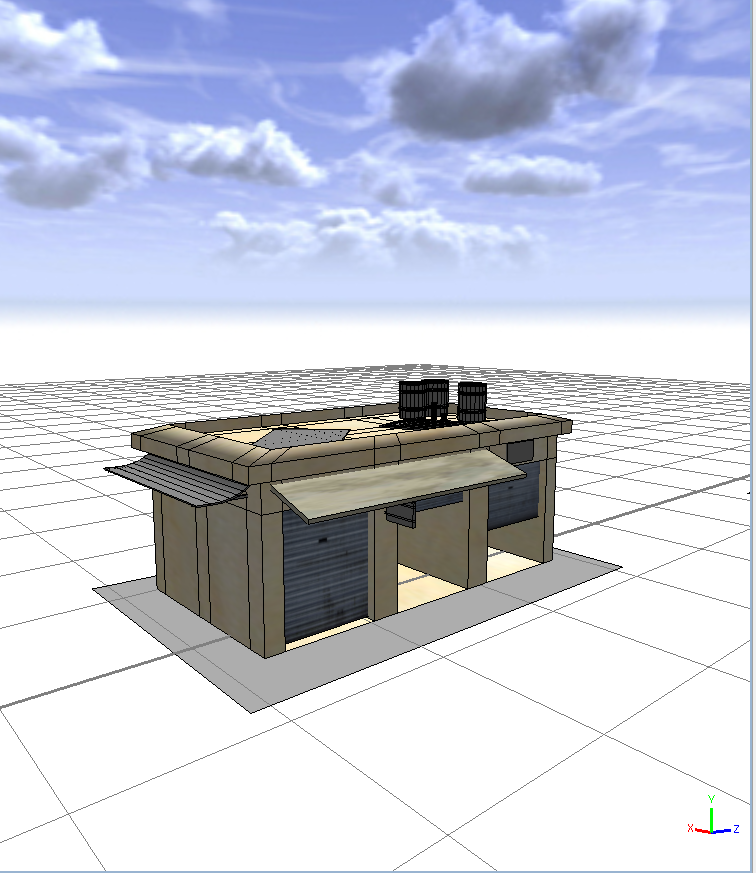
Created a scalable shack that generates additional garage doors at different positions depending on how wide the shack is.
Maya model imported into CityEngine:

Planning out the city:
One of the problems I've been thinking about was how to specify which lot contained what building. One of the potential ideas that came up was to create a variable that generated a building number randomly, and grow the lot from that. Something like:
//ATTRIBUTES//
attr building_type = rand(1,10) //we have 10 building styles here
//RULES//
Lot -->
case building_type == 1: Shack1
case building_type == 2: Shack2
...
else: Generic_building
Unfortunately, nothing happened when I tried running the above code. The next idea I tried was to filter the type of structure generated by the scopes of the lot sizes. Currently, if the x-scope and z-scope differ no more than 1, then a shack-structure will be created from the Lot. If either scope is smaller than 20, then a generic building will be created from that Lot. Although this system isn't very sophisticated, it does do the job of partitioning different lots for different structures. More changes may be implemented in the future.
Recap so far:
Created a scalable shack that generates additional garage doors at different positions depending on how wide the shack is.
Maya model imported into CityEngine:
Planning out the city:
One of the problems I've been thinking about was how to specify which lot contained what building. One of the potential ideas that came up was to create a variable that generated a building number randomly, and grow the lot from that. Something like:
//ATTRIBUTES//
attr building_type = rand(1,10) //we have 10 building styles here
//RULES//
Lot -->
case building_type == 1: Shack1
case building_type == 2: Shack2
...
else: Generic_building
Unfortunately, nothing happened when I tried running the above code. The next idea I tried was to filter the type of structure generated by the scopes of the lot sizes. Currently, if the x-scope and z-scope differ no more than 1, then a shack-structure will be created from the Lot. If either scope is smaller than 20, then a generic building will be created from that Lot. Although this system isn't very sophisticated, it does do the job of partitioning different lots for different structures. More changes may be implemented in the future.
Saturday, May 1, 2010
Another Update
-Just figured out how to convert .csv files into .dbf format via ArcCatalogue
Python Script I have so far:
# Most of it referenced from this tutorial
# There are some functions in the tutorial that returned an error when I tried to run it. This might be a version issue.
import sys, string, os, arcgisscripting
gp = arcgisscripting.create(9.3)
gp.Overwriteoutput = 1
#Specify the location for the new shapefile.
#gp.CreateFeatureclass("C:/Users/Alice/Desktop/Testing", "test_line.shp", "POLYLINE")
#Define Coordinate System
gp.workspace = "C:/Users/Alice/Desktop/Testing"
gp.toolbox = "management"
coordsys = "Coordinate Systems/Geographic Coordinate Systems/World/WGS 1984.prj"
gp.defineprojection("test_line.shp", coordsys)
#Open a cursor to insert rows into the shapefile.
cur = gp.InsertCursor("C:/Users/Alice/Desktop/Testing/test_line.shp")
#Create an Array and Point object.
lineArray = gp.CreateObject("Array")
pnt = gp.CreateObject("Point")
#Open a cursor on the table of XY coordinates to read from.
rows = gp.SearchCursor("C:/Users/Alice/Desktop/Testing/pythonTest.dbf")
#Reset the cursor to the top.
row = rows.Next()
#Loop through each record in the XY table..
while row:
#Set the X and Y coordinates for origin vertex.
pnt.x = row.GetValue("Origin_x")
pnt.y = row.GetValue("Origin_y")
#Insert it into the line array
lineArray.add(pnt)
#Set the X and Y coordinates for destination vertex
pnt.x = row.GetValue("dest_x")
pnt.y = row.GetValue("dest_y")
#Insert it into the line array
lineArray.add(pnt)
#Go to next row in table.
row = rows.Next()
#Insert the new poly into the feature class.
feat = cur.NewRow()
feat.shape = lineArray
cur.InsertRow(feat)
lineArray.RemoveAll()
del cur, row, rows
Python Script I have so far:
# Most of it referenced from this tutorial
# There are some functions in the tutorial that returned an error when I tried to run it. This might be a version issue.
import sys, string, os, arcgisscripting
gp = arcgisscripting.create(9.3)
gp.Overwriteoutput = 1
#Specify the location for the new shapefile.
#gp.CreateFeatureclass("C:/Users/Alice/Desktop/Testing", "test_line.shp", "POLYLINE")
#Define Coordinate System
gp.workspace = "C:/Users/Alice/Desktop/Testing"
gp.toolbox = "management"
coordsys = "Coordinate Systems/Geographic Coordinate Systems/World/WGS 1984.prj"
gp.defineprojection("test_line.shp", coordsys)
#Open a cursor to insert rows into the shapefile.
cur = gp.InsertCursor("C:/Users/Alice/Desktop/Testing/test_line.shp")
#Create an Array and Point object.
lineArray = gp.CreateObject("Array")
pnt = gp.CreateObject("Point")
#Open a cursor on the table of XY coordinates to read from.
rows = gp.SearchCursor("C:/Users/Alice/Desktop/Testing/pythonTest.dbf")
#Reset the cursor to the top.
row = rows.Next()
#Loop through each record in the XY table..
while row:
#Set the X and Y coordinates for origin vertex.
pnt.x = row.GetValue("Origin_x")
pnt.y = row.GetValue("Origin_y")
#Insert it into the line array
lineArray.add(pnt)
#Set the X and Y coordinates for destination vertex
pnt.x = row.GetValue("dest_x")
pnt.y = row.GetValue("dest_y")
#Insert it into the line array
lineArray.add(pnt)
#Go to next row in table.
row = rows.Next()
#Insert the new poly into the feature class.
feat = cur.NewRow()
feat.shape = lineArray
cur.InsertRow(feat)
lineArray.RemoveAll()
del cur, row, rows
Update May 1st
Right now the goal is to create a python script that plots the location on arcMap when given a longitude and latitude.
Subscribe to:
Posts (Atom)